Showing posts with label PowerShell. Show all posts

Wednesday, August 14, 2019

How to read an XLSX file in .net code natively, without any 3rd party tools


Much to my surprise, there is no native way to read xlsx files in C# or PowerShell. Recently I had to write code that grabbed values from an xlsx file on SharePoint and then include the values in an email that is programmatically sent out. I couldn't use 3rd party software, so this presented a challenge.

As it turns out, an xlsx file is actually a compressed file and it can be renamed to a .zip file and then the contents (mostly xmls) extracted and mapped to each other.

The code below will download an xlsx file to a local directory or open it from an local directory if the download is not needed and then it extracts the files inside and maps the xmls. I put comments at the top of the code, you need PowerShell 5.0 or later to leverage the extraction function. It also assumes the first sheet in the spreadsheet is named worksheet1, you'll have to pull that programmatically if that is not the case or change the hard coded name. The code maps the xml that carries a list of shared strings (to save space) to the worksheet xml that has a single numerical representation of that shared string inside of it, as well as a row and column delineator. Dates are tricky as Microsoft uses the number of days from January 1st, 1900 to the value as the actual numerical representation, as well as some formatting data in the XML, but if you are like me you only care about the value itself. There is some caveat where MS used 1900 as a leap year, even though it was not, google that if you are off by a day or two.

If you have more than the standard A to Z columns in use, you'll have to write extra code for that and some of the xml symbolic representations I didn't take the time to figure out what they were for as I didn't need to. If someone does, I'd appreciate a comment here explaining what they found.

If you use this code, all of yoru values should easily be accessible via $columnListOfTuples or $rowListOfTuples, which will include a row and column value, as well as the actual cell value.

This was a PITA so I hope this helps others.


<#

    $columnListOfTuples and $rowListOfTuples have everything mapped

    Each xlsx file is a compressed group of xml files into a zip file that is renamed .xlsx
    There is an xml of shared strings that are then represented by a single numerical value to save space
    There is an xml for each sheet in the spread sheet that has numerical references to the values in the shared strings xml
    To produce a virtual/programmatic representation of the spreadsheet, the code will read the sheet, then read the numerical reference than then cross reference that to the shared strings value
    I have no mapped out all functions and xmls in the compressed file, but this is enough to get you started
    It's only configured for columns A - Z, you'll have to write code for additional columsn
    You need powershell 5.0 or later to have the native unzip feature
    It assumes your first worksheet is named worksheet1
#>

cls;

#Region Read Xlsx file

    #Region Create temporary zip file and location

    $fileDate = [DateTime]::Now.ToShortDateString();
    $fileDate = $fileDate.Replace("/", "-");
    $fileTime = [DateTime]::Now.ToShortTimeString();
    $fileTime = $fileTime.Replace(":", ".");
    $fileTime = $fileTime.Replace(" ", ".");
    $fileDateTime = $fileDate + "_" + $fileTime;

    $networkFile = "http://[xxxxx].xlsx";
    $originalFile = "c:\temp\file.xlsx"; # file must exist and location must have writable rights
    #Invoke-WebRequest -Uri $networkFile -OutFile $originalFile -UseDefaultCredentials; # this is to download a network file locally, may not be needed

    $index = $originalFile.LastIndexOf("\");
    $originalFileDirectory = $originalFile.Remove($index);
    $tempCopiedFileName = $originalFileDirectory + "\tempXlsx-" + $fileDateTime + ".zip";
    $desinationPath = $originalFileDirectory + "\xlsxDecompressed";

    #Endregion /Create temporary zip file and location

    #Region Map all of the zip/xlsx file paths

    $relsXmlFile = $desinationPath + "\_rels\.rels";
    $item1XmlRelsXmlFile = $desinationPath + "\customXml\_rels\item1.xml.rels";
    $item2XmlRelsXmlFile = $desinationPath + "\customXml\_rels\item2.xml.rels";
    $item3XmlRelsXmlFile = $desinationPath + "\customXml\_rels\item3.xml.rels";
    $item1XmlFile = $desinationPath + "\customXml\item1.xml";
    $item2XmlFile = $desinationPath + "\customXml\item2.xml";
    $item3XmlFile = $desinationPath + "\customXml\item3.xml";
    $itemProps1XmlFile = $desinationPath + "\customXml\itemProps1.xml";
    $itemProps2XmlFile = $desinationPath + "\customXml\itemProps2.xml";
    $itemProps3XmlFile = $desinationPath + "\customXml\itemProps3.xml";
    $appXmlFile = $desinationPath + "\[filename]\docProps\app.xml";
    $coreXmlFile = $desinationPath + "\[filename]\docProps\core.xml";
    $customXmlFile = $desinationPath + "\[filename]\docProps\custom.xml";
    $workbookXmlRelsXmlFile = $desinationPath + "\xl\_rels\workbook.xml.rels";
    $theme1XmlFile = $desinationPath + "\xl\theme\theme1.xml";
    $sheet1XmlRelsXmlFile = $desinationPath + "\xl\worksheets|_rels|sheet1.xml.rels";
    $workSheet1XmlFile = $desinationPath + "\xl\worksheets\sheet1.xml";
    $sharedStringsXmlFile = $desinationPath + "\xl\sharedStrings.xml";
    $stylesXmlFile = $desinationPath + "\xl\styles.xml";
    $workbookXmlFile = $desinationPath + "\xl\workbook.xml";
    $contentTypesXmlFile = $desinationPath + "\[Content_Types].xml";

    #Endregion /Map all of the zip/xlsx file paths

    Copy-Item $originalFile -Destination $tempCopiedFileName -Recurse; # copy the xlsx file as a temporary zip file
    Expand-Archive -LiteralPath $tempCopiedFileName -DestinationPath $desinationPath -Force; # unzip the file
    [xml]$fileLines = Get-Content($sharedStringsXmlFile); # read the contents of the shared strings file

    #Region Map shared strings

    $arr_SharedStrings = New-Object System.Collections.Generic.List[String];
    for ($i = 0; $i -lt $fileLines.sst.si.Count; $i++ )
    {
        $line = $fileLines.sst.si[$i];
        $tuple = [tuple]::create([int]$i, [string]("`"" + $line.InnerText + "`"") );
        $arr_SharedStrings.Add($tuple); # map the shared strings to the representational number inside of the xml files
    }

    #Endregion /Map shared strings

    [xml]$fileLines = Get-Content($workSheet1XmlFile);
    $sheetData = $fileLines.worksheet.sheetData;

    #Region Map rows
    $arr_sheet1_rows = New-Object System.Collections.ArrayList; # this will have a list/tuple of each cell that makes up a row
    for ($i = 0; $i -lt $sheetData.row.Count; $i++ )
    {
        $arr_sheet1_individualRow = New-Object System.Collections.Generic.List[String];
        $rowElements = $sheetData.row[$i].c; #grab data of all cells in that row
        foreach ($element in $rowElements)
        {
            $elementsTuple = [tuple]::create([string]$element.r, [string]$element.s, [string]$element.v)
            $arr_sheet1_individualRow.Add($elementsTuple);      
        }

        $rowTuple = [Tuple]::create([int] $i+1, $arr_sheet1_individualRow);
        $arr_sheet1_rows.Add($rowTuple) | Out-Null;
    }

    $rowListOfTuples = New-Object System.Collections.ArrayList; # has row number, then column letter, then cell value
    foreach ($rowMapped in $arr_sheet1_rows)
    {
        $cellValues = $rowMapped.Item2;
        $rowNumber = $rowMapped.Item1;
        foreach ($cellValue in $cellValues)
        {
            $cellValue = $cellValue.Remove(0, 1);
            $cellValue = $cellValue.Remove($cellValue.Length - 1, 1);
            $cellValue = $cellValue.Replace(" ", "");
            $cellValuesSplit = $cellValue.Split(",");
            $columnLetter = $cellValuesSplit[0];
            $columnLetter = $columnLetter -replace '[0-9]',''
            $cellValueOnly = $cellValuesSplit[2];

            $cellTuple = [tuple]::create([int]$rowNumber, [string]$columnLetter, [string]$cellValueOnly);
            $rowListOfTuples.Add($cellTuple) | Out-Null;
        }
    }

    #Endregion /Map shared rows

    #Region Map shared columns

    $rowCount = $arr_sheet1_rows.Count;
    $sheetDataCols = $fileLines.worksheet.cols;
    $arr_sheet1_columns = New-Object System.Collections.ArrayList; # this will have a list/tuple of each cell that makes up a column
    #$arr_sheet1_columns.Add("Place holder") | Out-Null;
    #for ($i = 0; $i -lt $sheetDataCols.col.Count; $i++ )
    for ($i = 0; $i -lt $rowCount; $i++ )
    {
        if ($arr_sheet1_columns.Count -lt $sheetDataCols.col.Count)
        {
            for ($j = 0; $j -lt $sheetDataCols.col.Count; $j++ )
            {
                switch  ($j)
                {
                    0 { $columnLetterTranslated = "A"; break; }
                    1 { $columnLetterTranslated = "B"; break; }
                    2 { $columnLetterTranslated = "C"; break; }
                    3 { $columnLetterTranslated = "D"; break; }
                    4 { $columnLetterTranslated = "E"; break; }
                    5 { $columnLetterTranslated = "F"; break; }
                    6 { $columnLetterTranslated = "G"; break; }
                    7 { $columnLetterTranslated = "H"; break; }
                    8 { $columnLetterTranslated = "I"; break; }
                    9 { $columnLetterTranslated = "J"; break; }
                    10 { $columnLetterTranslated = "K"; break; }
                    11 { $columnLetterTranslated = "L"; break; }
                    12 { $columnLetterTranslated = "M"; break; }
                    13 { $columnLetterTranslated = "N"; break; }
                    14 { $columnLetterTranslated = "O"; break; }
                    15 { $columnLetterTranslated = "P"; break; }
                    16 { $columnLetterTranslated = "Q"; break; }
                    17 { $columnLetterTranslated = "R"; break; }
                    18 { $columnLetterTranslated = "S"; break; }
                    19 { $columnLetterTranslated = "T"; break; }
                    20 { $columnLetterTranslated = "U"; break; }
                    21 { $columnLetterTranslated = "V"; break; }
                    22 { $columnLetterTranslated = "W"; break; }
                    23 { $columnLetterTranslated = "X"; break; }
                    24 { $columnLetterTranslated = "Y"; break; }
                    25 { $columnLetterTranslated = "Z"; break; }
                }
                $arr_sheet1_columns.Add($columnLetterTranslated) | Out-Null;
            }       
        }

        $rowElements = $sheetData.row[$i].c; #grab data of all cells in that row
        foreach ($element in $rowElements)
        {
            $columnLetter = $element.r -replace '[^a-zA-Z-]',''
            for ($k = 0; $k -lt $arr_sheet1_columns.Count; $k++)
            {
                $column = $arr_sheet1_columns[$k];
                if ($column.StartsWith($columnLetter))
                {
                    $columnTemp = $column.ToString() + "|" + $element.v;
                    $arr_sheet1_columns.Remove($column);
                    $arr_sheet1_columns.Insert($k, $columnTemp);
                    $stop = "here";
                }
            }
        }
    }

    $columnListOfTuples = New-Object System.Collections.ArrayList; # has column letter, than row number, then cell value
    foreach ($columnMapped in $arr_sheet1_columns)
    {
        $index = $columnMapped.IndexOf("|");
        $columnMappedLetter = $columnMapped.Remove($index);

        $columnIndividualValues = $columnMapped.Remove(0, $index);
        $columnIndividualValuesSplit = $columnIndividualValues.Split("|");

        $rowNumber = 0;
        foreach($columnIndividualValueSplit in $columnIndividualValuesSplit)
        {   
            $cellTuple = [tuple]::create([string]$columnMappedLetter, [int]$rowNumber, [string]$columnIndividualValueSplit);
            $columnListOfTuples.Add($cellTuple) | Out-Null;
            $rowNumber ++;
        }
    }

    #Endregion /Map shared columns


    # Here you have all of the data and you can parse it however you want, below is an example of that

    #Region Parse the extracted data

    $rowsForParsing = New-Object System.Collections.ArrayList;
    foreach ($arr_sheet1_row in $arr_sheet1_rows)
    {
        $rowNumber = $arr_sheet1_row.Item1;
        $cellValues = New-Object System.Collections.ArrayList; 
        $rowTemp = "";

        $indexer = 0;
        foreach ($rowValue in $arr_sheet1_row.Item2)
        {
            $valueSplit = $rowValue.Replace(" ", "");
            $valueSplit = $valueSplit.Replace("(", "");
            $valueSplit = $valueSplit.Replace(")", "");
            $valueSplit = $valueSplit.Split(",");

            $cellLocation = "";
            $cellLocation = $valueSplit[0];
            $cellSType = "";
            $cellSType = $valueSplit[1];
            $cellStringRepresentationValue = "";
            $cellStringRepresentationValue = $valueSplit[2];
            $translatedValue = "";

            if ($cellStringRepresentationValue -ne "")
            {
                switch ($cellSType)
                {
                    "1" { $translatedValue = getStringMappedValue($cellStringRepresentationValue); break;}  # represents column headers
                    "2" { $translatedValue = [datetime]::FromOADate($cellStringRepresentationValue); break;}  # number of days from January 1, 1900
                    "3" { $translatedValue = getStringMappedValue($cellStringRepresentationValue); break;}  # mapped value to strings table
                    "4" {$translatedValue = getStringMappedValue($cellStringRepresentationValue); break;}  # mapped value to strings table
                    "5" { $translatedValue = getStringMappedValue($cellStringRepresentationValue); break;}  # mapped value to strings table
                    "6" { Write-Host "#6: " $rowValue; break;}  # not sure what 6 represents yet
                    "7" { Write-Host "#7: " $rowValue; break;}  # not sure what 7 represents yet
                    "8" { Write-Host "#8: " $rowValue; break;}  # not sure what 8 represents yet
                    "9" { Write-Host "#9: " $rowValue; break;}  # not sure what 9 represents yet
                    "10" { Write-Host "#10: " $rowValue; break;}  # not sure what 10 represents yet
                    "11" { Write-Host "#11: " $rowValue; break;}  # not sure what 11 represents yet     
                }
            }

            if (($rowTemp -eq "") -and ($indexer -eq 0))
            {
                $rowTemp = "$translatedValue";
            }
            else
            {       
                $rowTemp = "$rowTemp" + "|" + "$translatedValue";
            }   

            $indexer++;
        }

        if ($rowNumber -eq 22)
        {
            $stop = "here";
        }

        $rowsForParsing.Add("$rowNumber|$rowTemp") | Out-Null;
    }

    $fileInformation = New-Object System.Collections.ArrayList;
    $topRow = $rowsForParsing[1];
    foreach ($rowParsed in $rowsForParsing)
    {
        $rowParsedSplit = $rowParsed.Split("|");    
        $date = $rowParsedSplit[1];

        $pass = $true;
        try
        {
            $dtVal = get-date $date;
        }
        catch
        {
            $pass = $false;
        }

        if ($pass -eq $true)
        {
            if ((get-date) -gt (get-date $date))
            {
                $dateApplicableRow = $rowParsed;
            }
            else
            {
                Write-Host "Top row is $topRow";
                Write-Host "This weeks row is $dateApplicableRow";
                $fileInformation.Add($topRow);
                $fileInformation.Add($dateApplicableRow);
                break;
            }
        }
    }

    #Endregion /Parse the extracted data

#EndRegion /Read Xlsx file
Tuesday, July 19, 2016

How to run multiple PowerShell commands in c# (including pre-environment commands like set-adserversettings -viewentireforest:$true)


This allows me to create a script in a string with multiple commands, it processes 1 command at a time and then creates a runspace in c# and runs all of the powershell commands. The amount of commands that you could put inline in the string is endless.


<pre lang="C#">string scriptText = @"$pw = convertto-securestring -AsPlainText -Force -String '<password>'; $cred = new-object -typename System.Management.Automation.PSCredential -argumentlist '<domain>\<username>', $pw;  $session = new-pssession -ConfigurationName Microsoft.Exchange -ConnectionUri '<server url>/powershell' -credential $cred; import-pssession $session; Set-ExecutionPolicy bypass -confirm:$false -force; $pic = ([System.IO.File]::ReadAllBytes('" + <picture file name> + "')); set-userphoto -identity <username> -picturedata $pic -domaincontroller '<dc fqdn>' -confirm:$false;";

              
                runExchangeShellScript(scriptText);</pre>


<pre lang="C#">private string runExchangeShellScript(string scriptText)
        {
           
            Runspace runspace = RunspaceFactory.CreateRunspace();

            // open it
            runspace.Open();

            // create a pipeline and feed it the script text
            Pipeline pipeline = runspace.CreatePipeline();
            pipeline.Commands.AddScript(scriptText);
            RunspaceInvoke runSpaceInvoker = new RunspaceInvoke(runspace);
            runSpaceInvoker.Invoke(&quot;Set-ExecutionPolicy Unrestricted&quot;);

            // add an extra command to transform the script output objects into nicely formatted strings
            // remove this line to get the actual objects that the script returns. For example, the script
            // &quot;Get-Process&quot; returns a collection of System.Diagnostics.Process instances.
            //pipeline.Commands.Add(&quot;Out-String&quot;);

            // execute the script
            Collection&lt;PSObject&gt; results = null;
            try
            {
                results = pipeline.Invoke();
            }
            catch (Exception ex)
            {
                MessageBox.Show(ex.InnerException + &quot; - &quot; + ex.Message + &quot; - &quot; + ex.Source + &quot; - &quot; + ex.StackTrace + &quot; - &quot; + ex.TargetSite + &quot; - &quot; + ex.Data);
                return &quot;&quot;;
            }


            // close the runspace
            runspace.Close();

            // convert the script result into a single string
            StringBuilder stringBuilder = new StringBuilder();
            foreach (PSObject obj in results)
            {
                stringBuilder.AppendLine(obj.ToString());
            }

            // return the results of the script that has
            // now been converted to text
            return stringBuilder.ToString();
        }</pre>

Tuesday, February 10, 2015

How to count the number of DC's in your forest and individual domains with PowerShell

For some reason, with all the power of the internets, this answer was nowhere to be easily found.

I needed to be able to count the number of (Domain Controllers) DC's in our forest, and also for a specific domain. It's a simple PowerShell script ... here is what I used


cls

$domains = (Get-ADForest).Domains;

foreach ($domain in $domains)

{

    Write-Host $domain
    (Get-ADDomain -Identity $domain | select -ExpandProperty ReplicaDirectoryServers).Count;
    Write-Host "";
    $totalCount = $totalCount + (Get-ADDomain -Identity $domain | select -ExpandProperty ReplicaDirectoryServers).Count;
}

Write-Host "Total domain controller count is: "$totalCount

Tuesday, September 30, 2014

Why you should upgrade Distribution groups moving to Exchange Server 2013

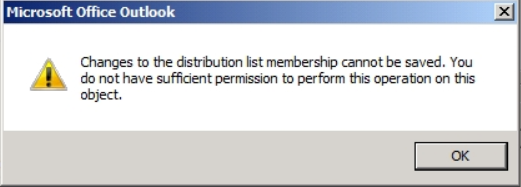
If you previously migrated from Exchange Server 2003 to Exchange Server 2007 and now moving to Exchange Server 2013, Group owners will not be able manage distribution groups created in Exchange Server 2003 or Exchange Server 2007 anymore. They can get the following error message when trying to make changes to a group from Outlook: 


In helping a user who could not manage a mail-enabled security group that she was the owner of and had all the correct rights and RBAC roles assigned, we saw that the Exchange Version for the problem group was 6.5 which was an old 2003 group that was not upgraded when our organization migrated to Exchange 2007 a few years ago.

When checking the group we were able to see the Exchange Version Number as shown below:
 
 
To upgrade the group using the Exchange Management Shell:
 
Set-DistributionGroup -id "Name of the group" -Forceupgrade -bypassSecuritygroupManagerCheck
 
After the group was upgraded we checked the Exchange Version number. It was now Version 14 as shown below. The user was able to manage the group after Active Directory (AD) Replication had occurred.


If you want to upgrade all your groups at the same time you can use the following from the Exchange Management Shell :
 
Get-DistributionGroup -ResultSize unlimited | Set-DistributionGroup -forceupgrade -bypassSecuritygroupManagerCheck
  
 
If you want to get list of the groups with their Exchange Versions in a report that can be shared with management before you begin to upgrade them, you can run the following from the Exchange Management Shell:
 

$groupdata = Get-DistributionGroup -ResultSize unlimited | select displayname, exchangeversion
 
$groupdata | export-csv c:\groups_exchversion.csv 

If you want to see the Exchange versions of your groups and get a count by Exchange versions, run the following in the Exchange Management Shell:
 
$groupdata | group ExchangeVersion
or
 Get-DistributionGroup -ResultSize Unlimited | Group ExchangeVersion if you had not done the previous CSV export like the example above.
 
The output should be similar to the following that I got running this in our environment today 


As you can see we have some work to do with upgrading our groups so let me get back to that. If you upgrade the distribution groups to Exchange 2013 but the owners/managers are still on Exchange 2007 they will no longer be able to manage the groups. This happens because the Exchange trusted subsystem cannot modify the legacy (2003 and 2007) objects. If you migrate the users to Exchange 2013 but the groups are not upgraded they will also not be able to manage the group. You should be following the guidance of using Exchange 2007 administrative tools to manage Exchange 2007 objects and using Exchange 2013 administrative tools to manage Exchange 2013 objects.  
 
Our current approach is to migrate the user mailboxes to Exchange Server 2013 and upgrade the groups for that specific OU to the Exchange 2103 version after the user migration. This way we can ensure that the groups are upgraded in the same timeframe as the user migration to avoid the support ticket that generated this blog post. 
 
Good luck to those of you moving to Exchange 2013. Please share your feedback and thoughts in the comments.

Friday, August 1, 2014

A possible fix for Calendar Meeting Requests showing up as email messages on a BlackBerry Device


A few weeks ago we started getting reports of users on Exchange Server 2007 with BlackBerry devices getting calendar meeting requests on their BlackBerry device as an email with no option to accept or decline the meeting. We discovered that the problem was due to the
-AutomateProcessing attribute of the impacted mailbox being set to None. The default should be AutoUpdate.
 
 To see the setting for a single user open the Exchange Management Shell on Exchange 2007and type Get-MailboxCalendarSettings user alias | FL
press enter and look at what the attribute -AutomateProcessing is set to:
 
 replace user alias with the appropriate alias for the mailbox you are checking.
 
 
To fix the issue, type Set-MailboxCalendarSettings user alias -AutomateProcessing AutoUpdate and press Enter. After it is complete you can check again using Get-MailboxCalendarSettings user alias | FL 
and you should see the following: 
 
replace user alias with the appropriate alias for the mailbox you are checking.

The users were then able to see Calendar Meeting Requests correctly on the BlackBerry device.


If you want to see of all the user Mailboxes that are set to None, you can type the following in the Exchange Management Shell:

Get-Mailbox -Resultsize Unlimited -RecipientTypeDetails UserMailbox | Get-mailboxCalendarSettings | Where {$_.automateprocessing -eq "None"} | FL Identity, automateprocessing > c:\usermbcalsettings.txt

If you want to change the ones that are found you can type the following in the Exchange Management Shell: Get-Mailbox -Resultsize Unlimited -RecipientTypeDetails UserMailbox | Get-mailboxCalendarSettings | Where {$_.automateprocessing -eq "None"} | Get-MailboxCalendarSettings -AutomateProcessing AutoUpdate


Notes:
  1. For Exchange Server 2010/2013 you will use Get-CalendarProcessing instead of Get-MailboxCalendarSettings and Set-CalendarProcessing instead of Set-MailboxCalendarSettings.

  2. You can only apply Set-CalendarProcessing to Resource Mailboxes. It cannot be used on User Mailboxes like was done for Exchange 2007 users as mentioned in this post. Additionally in Exchange 2103, Exchange ignores the -AutomateProcessing attribute on the user mailbox. So if it is set to None or AutoUpdate, Exchange treats the message the same way, which is to auto update the meeting.

Refer to RIM KB31558 for more information from RIM about this issue.


If this has helped you fix Calendar Meeting requests showing up as email messages on BlackBerry devices please share in the comments or if you have any additional insights in to this issue, it would be appreciated.

Thursday, March 6, 2014

Fun With PowerShell (Make it Speak)

In my downtime, I wanted to have some fun with PowerShell and make it speak using Add-Type -AssemblyName System.Speech. I have always written an age calculation script in every scripting language I have learned and I realized I had never done one in PowerShell. So I wrote one and decided to have it speak to you. Here it is:

---------------------------------------------------------------------------------
######################################## 
# Funscript.ps1                        # 
# http://imjustanengineer.blogspot.com #
# Written by DJ 3/2014                 #
######################################## 

Add-Type -AssemblyName System.Speech
$synthesizer = New-Object -TypeName System.Speech.Synthesis.SpeechSynthesizer

Write-Host This script will tell you how old you will be in $year and will speak to you. Make sure your speakers are on.;
$synthesizer.Speak("This script will tell how old you will be in ($year) and will speak to you. Make sure your speakers are on. ") | Out-Null
$name = Read-Host 'What is your name?';
$synthesizer.Speak("Hello, ($name) ,!") | Out-Null
$yb = Read-Host 'What year were you born?';
$synthesizer.Speak("Thank you, ($name) ,") | Out-Null
$date = Get-Date;
$year = + $date.Year;
$today = Get-Date -Format D;
$span = $year - $yb;
Write-Host Hello, $name. Today is $today. You will be $span years old this year. When is the party?;
$synthesizer.Speak("Hello, ($name). Today is ($today). You will be ($span) years old this year. When is the partee? ") | Out-Null
[System.Console]::Beep(262,200)
[System.Console]::Beep(262,200)
[System.Console]::Beep(294,200)
[System.Console]::Beep(262,200)
[System.Console]::Beep(349,200)

[System.Console]::Beep(330,200)
[System.Console]::Beep(262,200)
[System.Console]::Beep(262,200)
[System.Console]::Beep(294,200)
[System.Console]::Beep(262,200)
[System.Console]::Beep(392,200)
[System.Console]::Beep(349,200)
[System.Console]::Beep(262,200)
[System.Console]::Beep(262,200)
[System.Console]::Beep(482,200)
[System.Console]::Beep(440,200)
[System.Console]::Beep(349,200)
[System.Console]::Beep(330,200)
[System.Console]::Beep(294,200)
[System.Console]::Beep(482,200)
[System.Console]::Beep(482,200)
[System.Console]::Beep(440,200)
[System.Console]::Beep(349,200)
[System.Console]::Beep(392,200)
[System.Console]::Beep(349,200)


I would like to see what you can come up with. Be sure to leave your comments and suggestions below.

Friday, August 3, 2012

How to get around, bypass or defeat "A program is trying to automatically send email on your behalf" in Outlook 2010

If you've encountered this error like I have, you know it is a pain in the ass. You're writing code and trying to test it and you get blocked by Outlook security. Today I found a good solution that should be more widely available on the internet, then it is. These two registry keys disable that functionality. A C sharp code example is below and what I used to send emails in a console app. It loops and send a new incrementing subject email every 5 seconds. The code is from the internet and other people, that I've tweaked, same as the reg hacks. I have not tried this with some of the other programmatic ways to interact with Office, nor with other versions of Office. This may also work or affect the "A program is trying to access e-mail addresses you have stored in Outlook" as well.


[HKEY_CURRENT_USER\Software\Policies\Microsoft\Security] "CheckAdminSettings"=dword:00000002
    [HKEY_LOCAL_MACHINE\SOFTWARE\Microsoft\Office\14.0\Outlook\Security] "ObjectModelGuard"=dword:00000002 


using System;
using System.Collections.Generic;
using System.Linq;
using System.Text;
using System.Reflection;
using System.Threading;

/*

 Windows Registry Editor Version 5.00

    [HKEY_CURRENT_USER\Software\Policies\Microsoft\Security] "CheckAdminSettings"=dword:00000002
    [HKEY_LOCAL_MACHINE\SOFTWARE\Microsoft\Office\14.0\Outlook\Security] "ObjectModelGuard"=dword:00000002 


 */

namespace LateBindingTest
{
    class OutlookEmailerLateBinding
    {

        private object oApp;
        private object oNameSpace;
        private object oOutboxFolder;
        public static int messageNumber = 0;

        public OutlookEmailerLateBinding()
        {
            int loopNumber = 0;
            Type outlook_app_type;
            object[] parameter = new object[1];
            //Get the excel object
            outlook_app_type = Type.GetTypeFromProgID("Outlook.Application");
            //Create instance of excel
            oApp = Activator.CreateInstance(outlook_app_type);
            //Set the parameter which u want to set
            parameter[0] = "MAPI";
            //Set the Visible property
            oNameSpace = outlook_app_type.InvokeMember("GetNamespace",
            BindingFlags.InvokeMethod, null, oApp, parameter);

            var Logon_parameter = new object[4] { null, null, true, true };
            oNameSpace.GetType().InvokeMember("Logon",
            BindingFlags.InvokeMethod, null, oNameSpace, Logon_parameter);

            var GetDefaultFolder_parameter = new object[1] { 6 };
            oOutboxFolder =
            oNameSpace.GetType().InvokeMember("GetDefaultFolder",
            BindingFlags.InvokeMethod, null, oNameSpace,
            GetDefaultFolder_parameter);

            Console.WriteLine(messageNumber + " - Press enter to exit");
        }

        static void Main(string[] args)
        {
            //int messageNumber = 0;
            while (true)
            {
                messageNumber += 1;
                try
                {
                    OutlookEmailerLateBinding app = new OutlookEmailerLateBinding();
                    app.SendOutlookEmail("user1@domain.com; user2@domain.com", "Duplicate test message email " + messageNumber, "Test message. Testing. Only reply back if you see a duplicate.");
                }
                catch (Exception e)
                {
                    Console.WriteLine("Error Stack {0} ", e.Message);
                }

                //Console.ReadLine();

                Thread.Sleep(5000);
            }
        }

        public void SendOutlookEmail(string toValue, string
subjectValue, string bodyValue)
        {
            var CreateItem_parameter = new object[1] { 0 };
            object oMailItem =
oApp.GetType().InvokeMember("CreateItem", BindingFlags.InvokeMethod,
null, oApp, CreateItem_parameter);

            var mail_item_type = oMailItem.GetType();
            mail_item_type.InvokeMember("To",
                BindingFlags.SetProperty, null, oMailItem, new
object[] { toValue });
            mail_item_type.InvokeMember("Subject",
                BindingFlags.SetProperty, null, oMailItem, new
object[] { subjectValue });
            mail_item_type.InvokeMember("Body",
                BindingFlags.SetProperty, null, oMailItem, new
object[] { bodyValue });
            mail_item_type.InvokeMember("Send",
                BindingFlags.InvokeMethod, null, oMailItem, null);

        }

    }
}


On a side note, here is how to do it in PowerShell in a slightly different way by connecting directly to the Client Access Server (CAS).
.
if ( (Get-PSSnapin | Where-Object { $_.Name -eq "Microsoft.Exchange.Management.PowerShell.Admin"}) -eq $null )
  {
    add-pssnapin Microsoft.Exchange.Management.PowerShell.Admin
  }


 $emailattachment = "xx" # full path to attachment file

 $body = "xx" # body of email

 $smtp = new-object Net.Mail.SmtpClient("xxx") # Dns name or IP of your cas server
 $smtpuser = new-object System.Net.networkCredential
 $smtpuser.domain = "xx" # your domain
 $smtpuser.username = "xx" # your username
 $smtpuser.password = "xx" # your password
 $smtp.Credentials = $smtpuser
 
 $SmtpClient = new-object system.net.mail.smtpClient
 $MailMessage = New-Object system.net.mail.mailmessage
 $SmtpClient.Host = "xxx" # Dns name or IP of cas server
 $mailmessage.from = "xxx" # your email address
 $mailmessage.To.add("xx@xx.xx") # email address to send to
 $mailmessage.Subject = "xxx" # subject
 $MailMessage.IsBodyHtml = $False
 $mailmessage.Body = $body 
 $attachment = New-Object System.Net.Mail.Attachment($emailattachment, 'text/plain') # you may have to change the file type or encrypt file with 7zip to get around gmail file attachment restrictions
   $mailmessage.Attachments.Add($attachment)
 $smtp.Send($MailMessage)


Tuesday, June 19, 2012

How to Have a Daily PowerShell Report of your Exchange 2007 backups sent to you everyday.

Have you ever needed a way to quickly tell what was going on with your Exchange 2007 backups at night when you are not in the office? I came up with this script back in 2010 that helps you do that using PowerShell combined with Scheduled tasks on a Windows Server. Tested on Exchange 2007 and PowerShell v1 and v2.

We do Full Backups daily but if you want to, you can add “LastIncrementalBackup”or “LastDifferentialBackup” to suit your needs.

Here is the script:
------------------------------------------------------------------------------------------------------------
#######################################
#Backup_report_vs1.ps1                #
#http://imjustanengineer.blogspot.com #
#Created by DJ 6/2/2010               #
#######################################

Add-PSSnapin Microsoft.Exchange.Management.powershell.admin;

Get-Mailboxserver | Get-MailboxDatabase -Status |FL Name,Server,lastfullbackup,backupinprogress,Mounted > c:\exch2007_backups.txt

start-sleep -s 120

$filename = “c:\exch2007_backups.txt”
$smtpServer = “your.smtpserver.com” #Enter FQDN of your SMTP server

$msg = new-object Net.Mail.MailMessage
$att = new-object Net.Mail.Attachment($filename)
$smtp = new-object Net.Mail.SmtpClient($smtpServer)
$msg.From = “BackupReportingScript@yourdomain.com” #Enter senders email address $msg.To.Add(”recipient1@yourdomain.com, recipient2@yourdomain.com,”) #Enter one or more recipient addresses
$msg.Subject = “Exchange 2007 Servers Backup Report" #Enter subject of message $msg.Body = “Attached is the Daily Exchange 2007 Servers Backup Report. Please note any servers that have not been backed up for more than a day.” $msg.Attachments.Add($att)

$smtp.Send($msg)
-----------------------------------------------------------------------------------------------------------

In the created text file on your C: drive you should output that looks like

Name             : EXCH-SERVER01_SG01DB01
Server           : EXCH-SERVER01
LastFullBackup   : 6/7/2010 2:33:10 AM
BackupInProgress : False
Mounted          : True


Please let us know if this is helpful to you.
