
This post is inspired in part by my friend Chip Dizárd who is new to Windows Phone which has been out since 2010 and I have been an owner of a HTC Trophy Phone since July 2011 and the Windows Phone Marketplace now has over 100,000 apps, For those of you who are new to Windows Phone, I'd like to share My Top 10 Windows Phone apps that I like and that I find useful.(not listed in any order)
10. WeatherLive

 WeatherLive is a great weather app with great Live Tile Support. Being able to quickly see the updated forecast for my location from the Live Tile pinned to my Start Screen, See the10 day outlook, radar and satellite views as well as view webcams is fantastic. Publisher: Hyperise
Cost: Free
9. Slacker Radio

 Slacker Radio is a great way to listen to music. I am not one of those people who has 5,000 songs on my device. Slacker Radio gives me access to over 200 professionally programmed stations as well as letting me create a station based on my tastes in music. Publisher: Slacker, Inc. Cost: Free
8. Rowi [lite]

 I know that there are quite a few choices for Twitter Apps in the Windows Marketplace but I find Rowi to be a great Twitter app for Windows Phone with a simple interface. I like being able to pin my @mentions to my start screen. There are ads in the [lite] version of the app. Publisher: Hidden Pineapple, LLC Cost: Free and $1.49 (ad-free with push notifications)
7. FoodSpotting


The Foodspotting app makes finding food recomendations at restaurants easier. I use it to take photos of good foods & share where to find them. I always check it for recommendations when I travel and I add the places I visit so others can see what's great.
Publisher: Foodspotting
Cost: Free
6. Betty Crocker

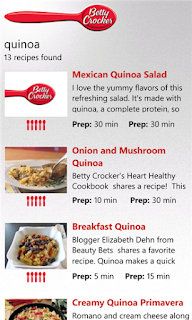
Solve the age old question of What's for dinner? Get great recipes from the mobile version of the world-famous Betty Crocker cookbook. I use it to update my Evernote grocery shopping list for ingredients for the meal.
Publisher General Mills Inc.
Cost: Free
5. Open Table

 For the times when I do not cook at home, I like being able to make restaurant reservations for free, instantly from my Windows phone with Open Table. There are more than 15,000 OpenTable-enabled restaurants in the United States, Canada and United Kingdom.
Publisher: OpenTable, Inc.
Cost: Free
4. GasBuddy
When I need to know if gas is cheaper near my home, near my job or near me if I am out running errands or traveling, I click on Gas Buddy before I start driving. Gas Buddy also tells you in miles, how far away you have to drive to get it. As an added bonus, if you help report gas prices at stations if they are different, you can get a chance to win free gas.


Publisher GasBuddy.com
Cost: Free

 Evernote allows you to create notes, lists that can be accessed from anywhere and shared with anyone. I can create shopping lists on my iPad that I can view on my phone while I am at the store. Or I can create the list on my phone while looking at a recipe on the Betty Crocker app. You can also update your Evernote notes from your computer.
Publisher Evernote
Cost : Free
2. SBux


Though it is not the official Starbucks app, SBUX comes pretty close to matching what Starbucks has done for iOS and Android devices. Paying with the phone, finding the closest starbucks to your current location and adding multiple cards are some of the features I like.
Publisher Denham Software Solutions
Cost : Free
1. Vimeo


The Vimeo app allows you watch videos as well as manage your videos if you have any on the site. You can create pinned tiles with your videos or featured channels. Sharing videos using social media is easy.
Publisher: Vimeo
Cost: Free
Conclusion
While there are thousands of apps available for Windows Phone users to get including others that do similar things to my list of Top 10 Windows Phone apps, I hope you will check out the ones I have shared in this post. I like the features and functionality provided by apps and I invite you to share some of your favorite Windows Phone apps in the comments.
Disclaimer
I was not compensated financially for mentioning any of the apps included in this post. I was, however, rewarded with satisfaction and enjoyment which allowed me to create this post about My Top 10 Windows Phone Apps.
